
We value your time, listen to full article here:
How to Become a Vendor on Amazon? And Where It Gets Difficult
It sounds like you want to learn how to get an Amazon Vendor account. This is a good opportunity! You don’t need to deal with customers, and you don’t have to worry about transportation. Amazon did it for you!
The problem is that you cannot learn how to set up such a supplier account. You must be invited to do so, there is no matter of logging in or registering in any way. There is no way to learn how to register as a supplier on Amazon without first receiving a direct message from Amazon asking you to do so.
That may have made your sail a little breathless. After all, getting a company like Amazon to focus on your small or new products is not easy. Amazon selects and invites many different companies to join the program. This may include:
- Brands that are in high demand by shoppers on the site.
- Amazon sellers who use their products to perform well on the site.
- Other products that Amazon, which has attractive products, think are beneficial to the site, such as products from trade shows or research.
Amazon often sends an email saying that they are interested in selling products on the site. It’s as simple as replying to an email and telling them that you are interested. They will then explain the process and provide you with a terms of service agreement.
It should be noted that you usually don’t have much room for negotiation here. Amazon often quotes you. You can accept it, or you can say no. Larger brands and more well-known products-especially products that customers want-are more likely to visit the program.
You may not be able to access Amazon Vendor Central immediately, but once you receive an invitation, you want to take advantage of the opportunity. How did you do?
How to Build Your Business with Amazon Vendor Central?
You can learn how to use Amazon Vendor Central by simply completing the setup process. We will explain a lot here. Suppose you want to get an invitation and you want to learn how to become an Amazon supplier.
The process is easy. You will have the right to create an account on the Amazon website.
Working with the Amazon Vendor Platform
There are many functions on this platform for you to use. It pays to know them, so you can make the right decision for your product. Here are some of the most important.
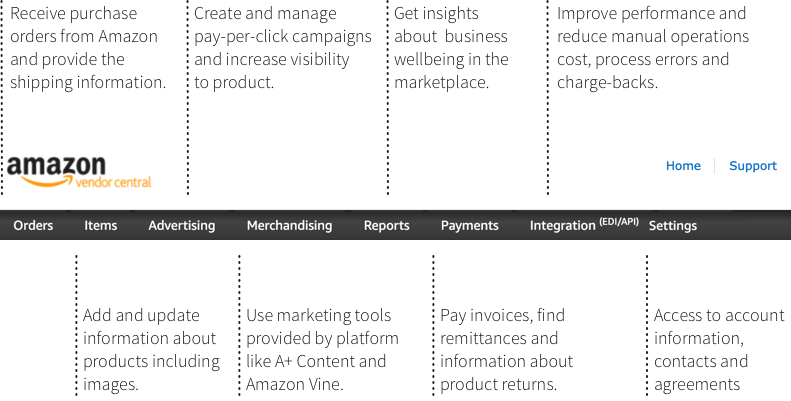
- Orders: The place where you will receive the purchase order from Amazon. You will also provide shipping information here.
- Marketing: Positioning marketing tools for your products. Here you can access some of the tools provided by Amazon, such as A + Content and Amazon Vine.
- Items: A place to update and contain all valuable information about your product. It includes images.
- Payments: The invoice is paid here. You can also find all remittances here.
- Reporting: It is a good idea to pay close attention to this area. Your report will give you insight into the performance of your business in the market. The Amazon Retail Analytics feature also provides more details.
- Advertising function: A place to create and manage pay-per-click campaigns and improve product visibility.
Now that you have navigated the dashboard, you may want to know how Amazon places an order. After the account is up and running, you will receive a purchase order. Most companies see this content about once a week (usually on Monday). If the company wants more stock products, for example, if demand surges, you may see them more frequently.
According to Amazon’s business model, they don’t want to store too much inventory in the warehouse. Instead, it prefers more frequent but smaller deliveries. The company does not want to spend a lot of money to store a lot of products.
What you know about Amazon Vendor Central so far may make you eager to see the beginning of your first purchase. This does not always happen immediately. You will quickly understand this automated process, someone needs to pull the trigger to promote the product to Amazon. Amazon’s system is complex, but it is also very efficient. It looks at sales history, determines the current level of demand for the product, and then automatically makes investment decisions.
The initial order may be small. Amazon has just conducted a trial run. As the product sells and sometimes sells out, you may see larger orders. If the first order is small, don’t panic. This does not mean that your long-term sales are limited.
Filling the Orders?
When you see the first purchase order, it’s awesome. You will feel that you have just won the big contract you have been waiting for (maybe you have already won it!), but most people will worry about this thin line. Sell on Amazon. “What if I don’t have enough inventory to execute the order?”
Most companies do not have a lot of cash on hand to own large warehouses or product storage rooms. However, you need to be fully prepared to meet Amazon’s needs. If you are unable to fulfill the order, you may have to cancel it. Amazon sometimes provides you with the option to postpone your order. Whenever you are out of stock, the product will be shown as unavailable on the site. If you forget to make the product unavailable and cause a large backlog of out of stock, Amazon can create a refund form, which is a fee you must pay.
How Does Amazon Pay Vendors, Then?
This is a common problem, and fortunately, it is very simple. Like most other aspects of the website, it is automated.
First, vendors can set their own wholesale prices within the platform. This will be done when the bill of materials is created in the system. Then, Amazon decides whether the price is acceptable. If not, they will sometimes send you an email asking you to provide a lower price. You can also see the price they are willing to pay. You can accept it or negotiate with them to some extent.
There is no doubt that Amazon will shine in its pricing. This is one of the factors that help them succeed. However, if you do not want to be ordered by the company, you can choose not to use Vendor Central. Instead, you can list your product as a seller and avoid using it.
After the price is in place and the order is paid, you will receive the payment. Usually, this process is completed between 60 to 90 days.
Associated Costs With Amazon Vendor Central
First, the cost of using Amazon Vendor Central comes from lowering the price to meet the wholesale price required by the company. In addition, Amazon will also collect 4% to 10% of cash outlays from cooperatives.
This is different from the price found in the Amazon seller account. Here, you need to pay a fixed referral fee, usually 8% to 20% of the price of the goods sold, plus Amazon’s delivery fee.
When making a profit on Amazon Vendor Central, you should expect wholesale profit. The infographic below provides some tips to strengthen your position in negotiating supplier terms with Amazon.

the Benefits to Your Business.
When you consider the benefits of Amazon Vendor Central, there are a few things to be aware of. For many companies that produce products, the biggest benefit is that you no longer need to deal with customer service. Through wholesale, to a certain extent, all the responsibility of selling and attracting buyers falls on Amazon. They handle problems, concerns and shipping for you.
If you want to get higher profits from each sale, then if you can take advantage of marketing and listing optimization that are critical to doing well here, Amazon Seller accounts tend to do better. When you understand how to become a supplier on the Amazon marketplace, you will undoubtedly lose control over the product details and prices of your products. For some companies, this approach may be a worrying factor.